‹ Back to the homepage‹ Voltar pra página inicial · All postsTodos os posts
A volleyball scoreboard for my Forerunner 255
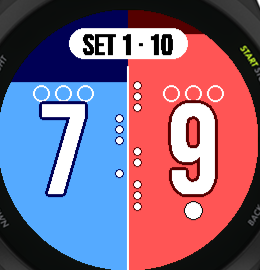
Beach volleyball is my favorite sport, and I wanted a scoreboard I could run from the buttons of my watch. So I wrote one for the Forerunner 255. It is called Volley Score, it is sideload only, and the code is open.
Most of the work was not drawing the screen. It was deciding what happens when someone scores by mistake, when the score is tied at the end, and when the watch goes to sleep in the middle of a set.
A match is a list of events
The app does not store a score. It stores a list of events: a point for the left team, a point for the right team, a change of serve, a tie-break rule. To get the score it replays the list from the start.
That makes undo almost free. Dropping the last event takes the point back, even if it was the point that ended a set, and the same list is what the app saves after every change. If the watch sleeps or I leave the app, reopening it replays the list and the match is still there. The list stops at 400 events, which is far more than a match needs.
The rules (the set goal, win by two, the tie-break caps, the deciding set, undo across sets, the serve and saving) have unit tests that run in the Connect IQ simulator.
Three buttons, two teams
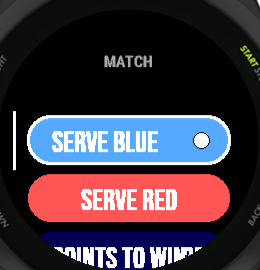
The buttons are laid out like the screen. UP gives a point to the team on the left, START to the team on the right, DOWN undoes the last action, and BACK leaves the app. Holding UP opens a menu with big rows: who serves, points to win, the tie-break rule and a new match.
The tie-break question
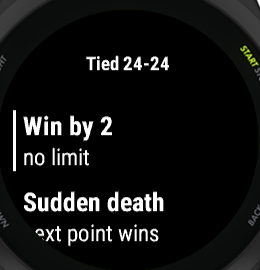
When a set reaches one point short of its target for both teams, the app asks once how to play it out: win by 2, sudden death, or a hard cap of target plus 1, 2 or 3. There is also an "undo that point" row, for the case where the tie was a slip. The answer is remembered for the rest of the match and for the next one, and I can change it in the menu.
Points to win, and why it became a roulette
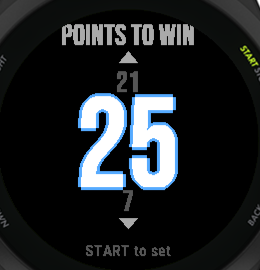
The set goal changed three times in three small changes. First a menu with four goals, then six, then any value from 1 to 25 with 10 as the default. A list was never going to cover every game, so the last version is a roulette: UP and DOWN turn it, START sets it, BACK cancels. The deciding set stays at 15 points at most, and the choice goes into the event list like everything else, so DOWN undoes it.
A screen I can read mid-rally
Each team's half fills with its color as it scores, in proportion to the points needed to win the set, so I can see who is ahead without reading a number. The digits are white with a dark outline, so they stay readable at any amount of fill. Three dots above each score are the sets won. Down the middle, one dot per point of the set sits on the side of the team that scored it, so a run of points shows as a stack on one side.
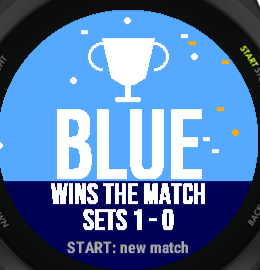
When the match ends, the whole screen turns the winner's color with a trophy and confetti.
Gotchas
- Changing the log format. When the free goal replaced the old list of goals, the old goal events could have broken a match saved by an older build. The new goal events use a new range of values, and the old ones are ignored.
- The simulator cannot judge the buttons or the buzz. The screens and the rules were checked in the simulator, but how the buttons feel and how the haptics land (a short buzz per point, a double buzz at the end of a set, a long double buzz at the end of the match) are things only the real watch shows.
- Fonts and icons are generated. The Bebas Neue score fonts and the 40 by 40 pixel-art volleyball icon are built by a script and the results are committed, so building the app needs only the SDK.
Try it
The code is in the garmin-watchfaces repository, in the volleyscore folder. It needs the Connect IQ SDK and your own developer key. Then build it:
monkeyc -d fr255 -f volleyscore/monkey.jungle -o volleyscore/bin/VolleyScore.prg -y <your developer_key.der>To install it, connect the watch over USB, copy VolleyScore.prg into the GARMIN/APPS folder, and unplug. It is not on the Connect IQ Store.